One anaesthesia team, many practices — a single plan
How an anaesthesia service runs every partner practice from one Viali tenant — the practice submits its operating day by link, staffing is ranked by commute time, and countersigned hours become the monthly statement.
TL;DR
An anaesthesia service provider runs every external practice out of a single Viali tenant. The practice needs only an email address: it submits its operating day through a portal link, the cases land in the provider's deployment plan, staff are ranked by commute time to each practice, and countersigned presence hours become a monthly statement per practice and role. Questionnaire, pre-operative assessment, anaesthesia record and TARDOC billing stay in the provider's own tenant, identical at every location.
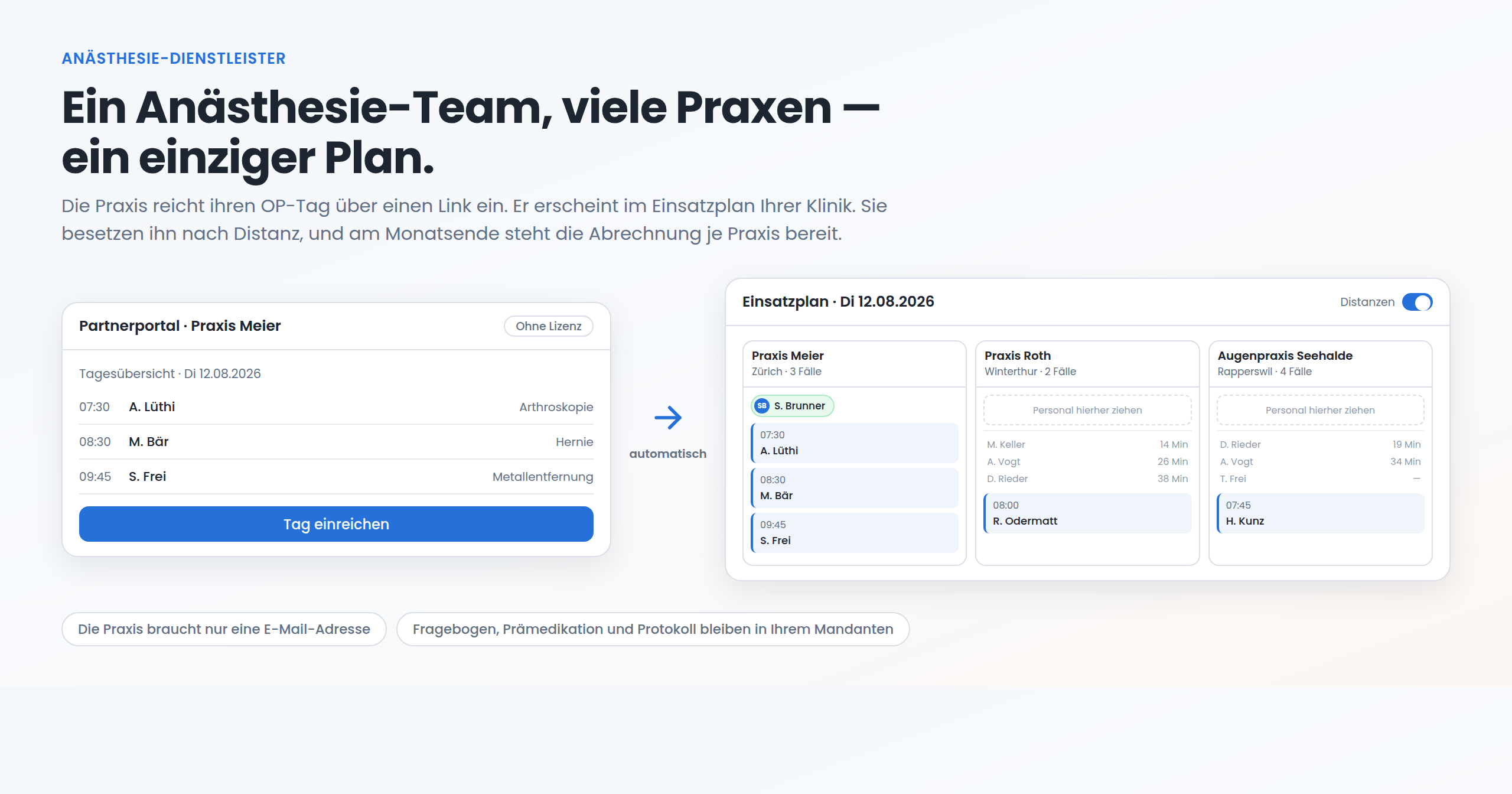
Who is this for? Anaesthesia service providers: a team that anaesthetises in practices and day clinics it does not own. Viali runs the whole chain out of a single tenant — from inviting the practice to invoicing the countersigned hour. The practice needs nothing but an email address.
An anaesthesia service with thirty, fifty or eighty partner practices does not have a scheduling problem in the usual sense. It has a distribution problem.
Tuesday's list arrives differently from every practice: a WhatsApp message, a PDF attachment, a phone call on Monday evening. It gets copied into a spreadsheet. Staffing comes out of that spreadsheet, usually out of one person's head — the person who knows who lives where and who has a car. At month end the timesheets are hunted down, added up and typed into an invoice. Every one of those steps works. Together they make a process that does not scale, and that stops the day the person with the knowledge in their head falls ill.
The usual proposal is: give every practice a licence. That fails at eighty practices before it starts. A practice that operates twice a month will not install clinic software, will not train anyone, and will not maintain master data.
Viali turns the direction around. The practice gets a link, and nothing else. Everything else — planning, documentation, hours, billing — happens in the service provider's own tenant.
Step 1 · Switch on agency operation
A Viali tenant can operate an agency of its own. With agency status active, Partners → Sites lists the practices the team works for.
A site is deliberately not a clinic as far as the software is concerned: no account, no users, no licence. It is a counterparty with an address, one or more rooms, and a rate.
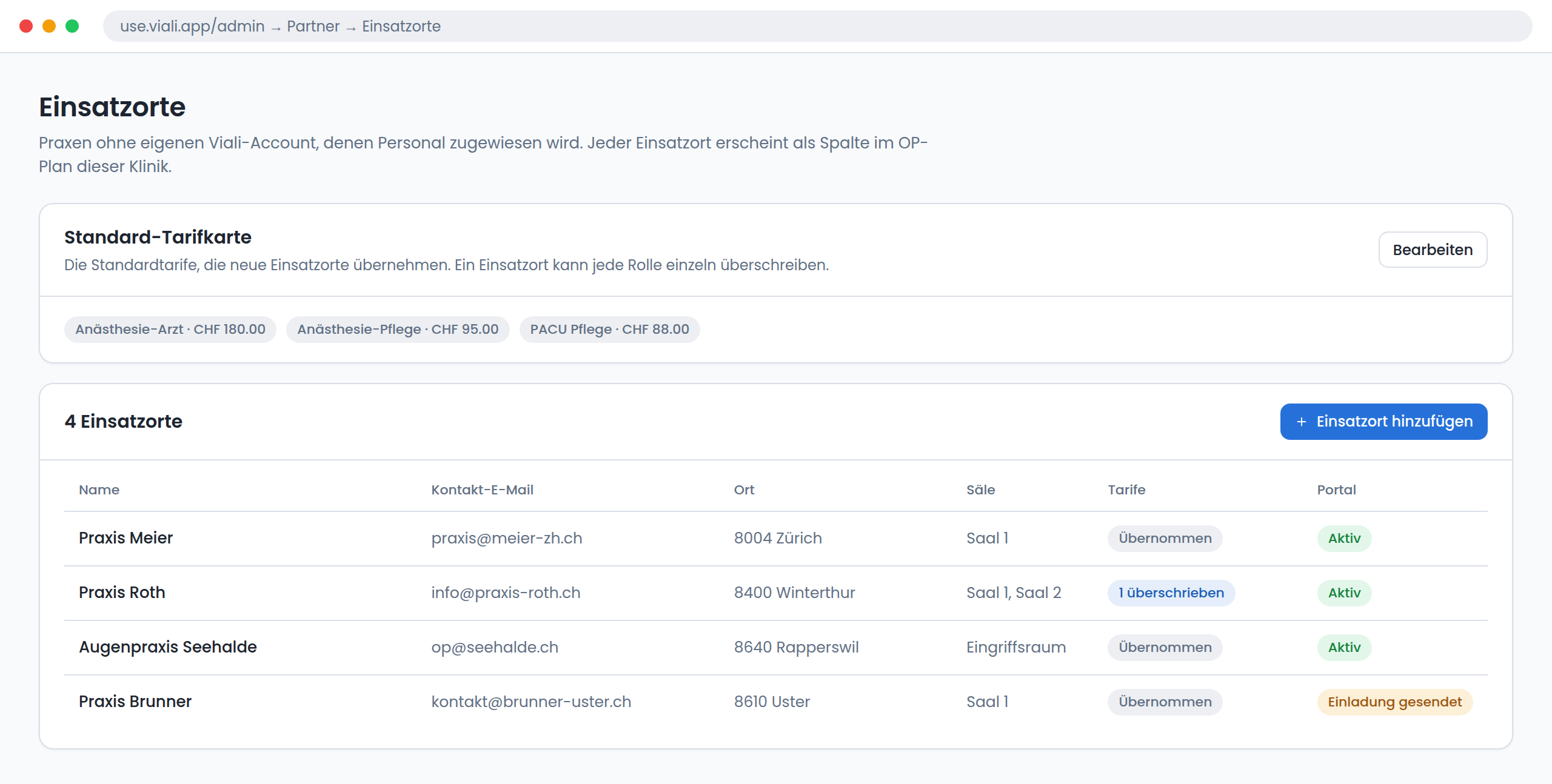
The standard rate card holds the rates every new site inherits. A practice that negotiated differently overrides individual roles; the rest stay on the standard and follow it when it changes. The list shows at a glance which practice is on the standard and which has its own arrangement.
One rule is deliberately strict: a site without a rate cannot receive an assignment. The rate is the basis of the later invoice — without it, work would be performed that cannot be valued. Viali blocks that at creation rather than at month end.
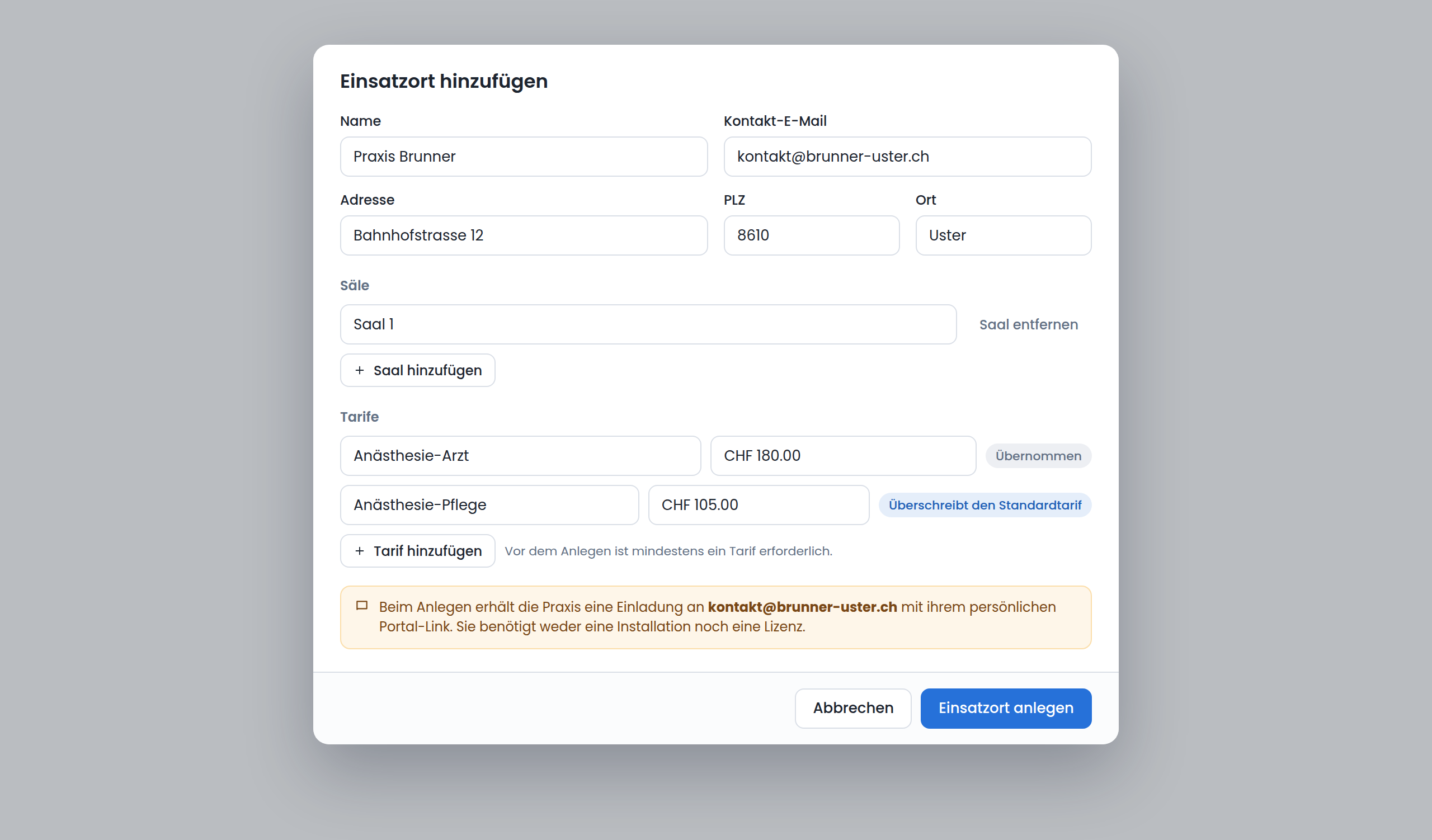
The postal code is not decoration: it is what later ranks staff by commute time. On creation, an invitation goes to the contact address with the practice's own portal link.
Step 2 · The practice submits its own operating day
The practice opens the link and is in the partner portal. No password, no installation, no training. Under Cases, *submit the day* takes the whole day in one step.
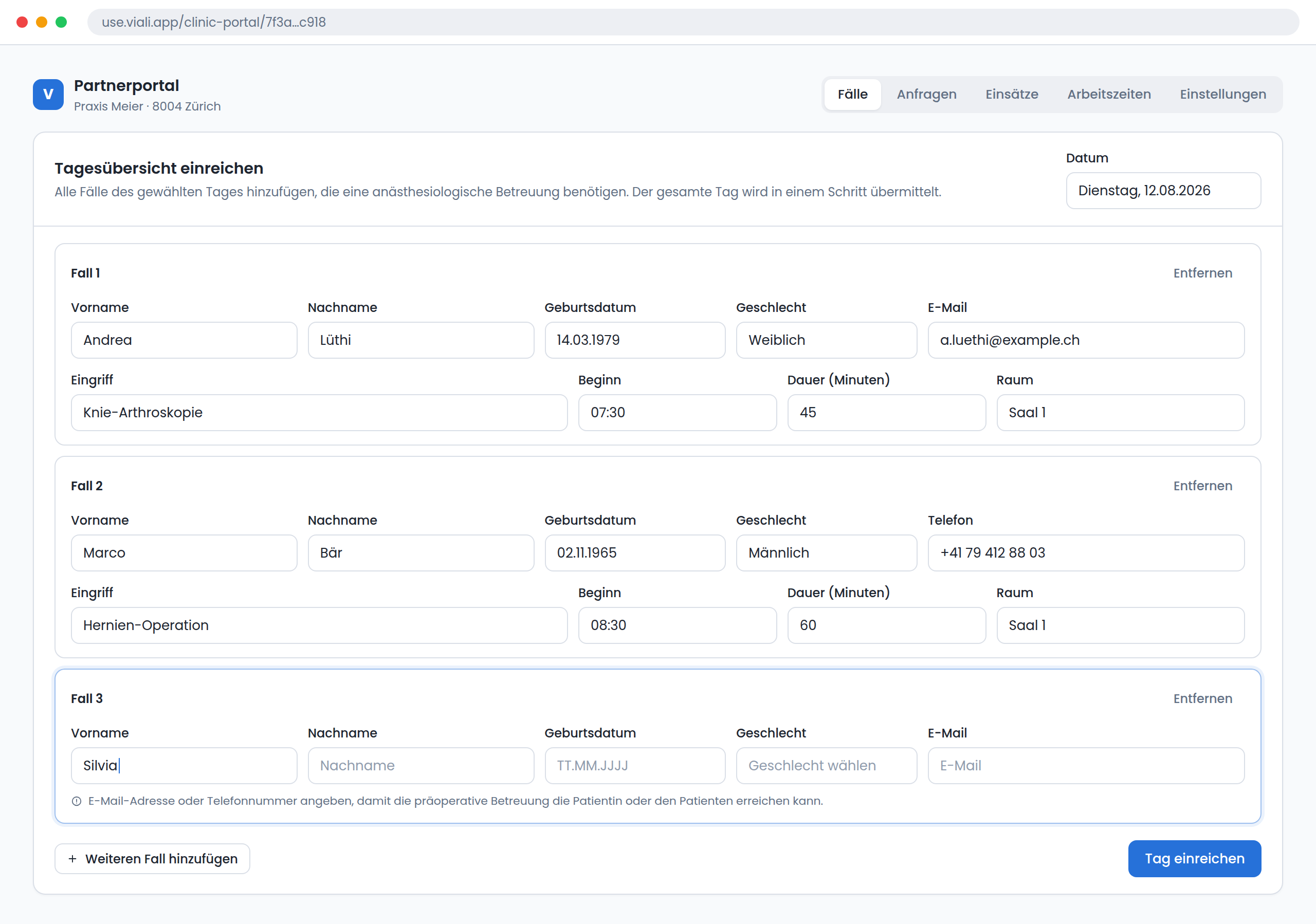
Per case: patient details, contact (email or mobile, required), procedure, start time and duration. The contact detail is not bureaucracy; it is the precondition for pre-operative care reaching the patient at all — the questionnaire and the premedication depend on it.
Two design decisions here matter more than they look:
- There is no approval step. The submitted day lands directly in the service provider's OR plan. Approving eighty practices one at a time only moves the bottleneck.
- Plausibility problems warn, they do not block. Overlapping cases in one room, a date in the past, an implausible duration: Viali flags them and submits anyway. A practice turned away by a form goes back to the phone — and then the whole path was built for nothing.
Step 3 · The day appears in the deployment plan
The cases show up in the provider's own OR plan, in that practice's column. A plan selector switches between three views: *OR plan* shows the provider's own theatres, *All* shows own theatres and external practices together, and the deployment plan shows only the practices actually operating on the selected date.
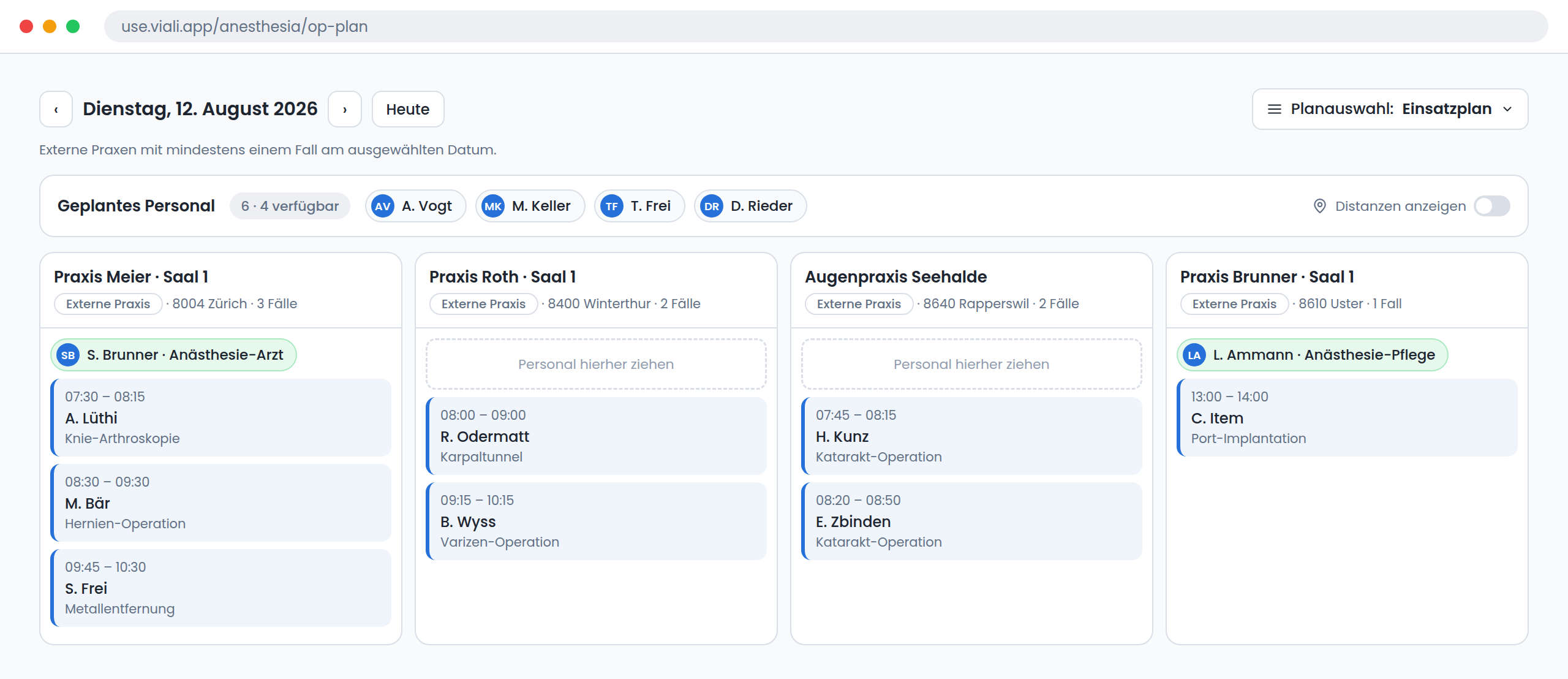
That is the decisive difference from one calendar per customer. On an ordinary Tuesday perhaps four of eighty practices operate. Those four stand side by side, with case count, location and staffing — and anyone already assigned that day is immediately visible.
Step 4 · Staffing, with commute time as the groundwork
A distance means nothing until you say distance to what. So the candidate list does not live in the staff pool; it lives inside the practice's column — where the question is being asked.
A single switch, show distances, turns the list on in *every* unstaffed column at once. Each column computes its own ranking, so the whole day is comparable without a single interaction.
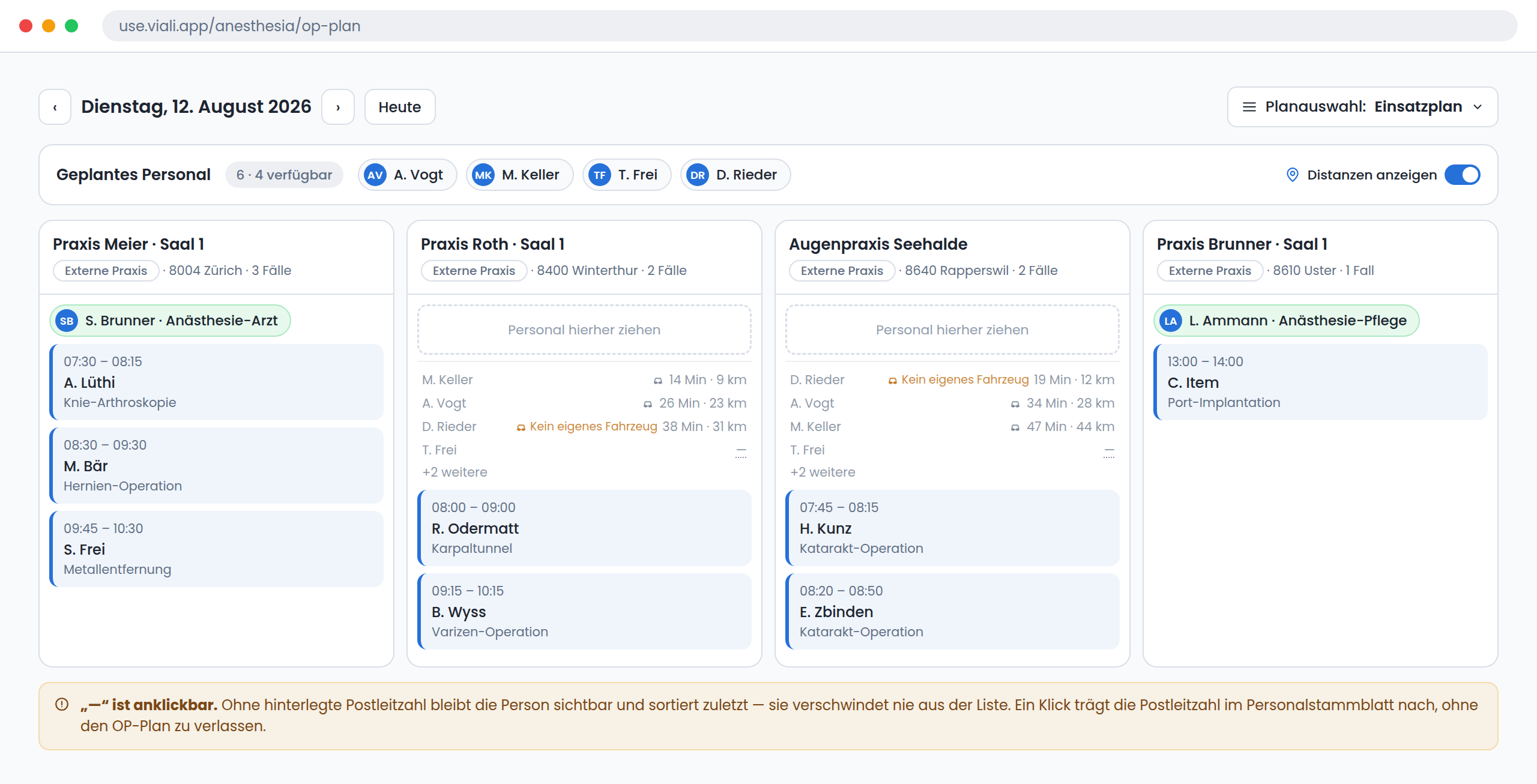
The ranking is by driving time, not by straight-line distance — and in Switzerland those are not the same thing. Two practices fifteen kilometres apart on the map are twenty minutes or fifty-five minutes apart depending on which side of a lake or a pass they sit. The question that actually matters at 06:30 is not "how far" but "will this person be there by 07:00". So the minutes lead and the kilometres sit beside them.
The details are what make it usable:
- The commute time sits in the row, not in a tooltip. A tooltip is invisible on an iPad and makes comparing two practices impossible.
- "No own vehicle" sits next to the time. For a rural practice at 07:00 that often outweighs a short commute — the calculated time assumes travelling by car.
- A missing postal code shows "—", and the person stays in the list, sorted last. Hiding a qualified person from the planner because a master-data field is empty would be the worse mistake. The "—" is clickable and fills the postal code into the staff record without leaving the OR plan.
- The lists update on assignment. Whoever is staffed disappears from every other column's candidates.
The ranking is a proposal, not a decision. Someone who knows the practice knows the second-nearest person is the right one — the system does the groundwork, the judgement stays with the planner.
Step 5 · An assignment becomes a deployment
Assigning a person to a practice column creates a deployment: person, practice, date, role and the stored rate. The practice does not have to accept it — the agreed rate is the authorisation.
Planned times come from the day's case list. Billing, however, does not:
Presence is not incision time. What is billed is arrival to departure — including setup, gaps between cases and waiting. A day with three short procedures between 07:15 and 15:00 is a day on site, not a day with two hours of incision time.
The deployed person confirms their assignments in the worker portal and corrects the times to actual presence. Then the practice countersigns.
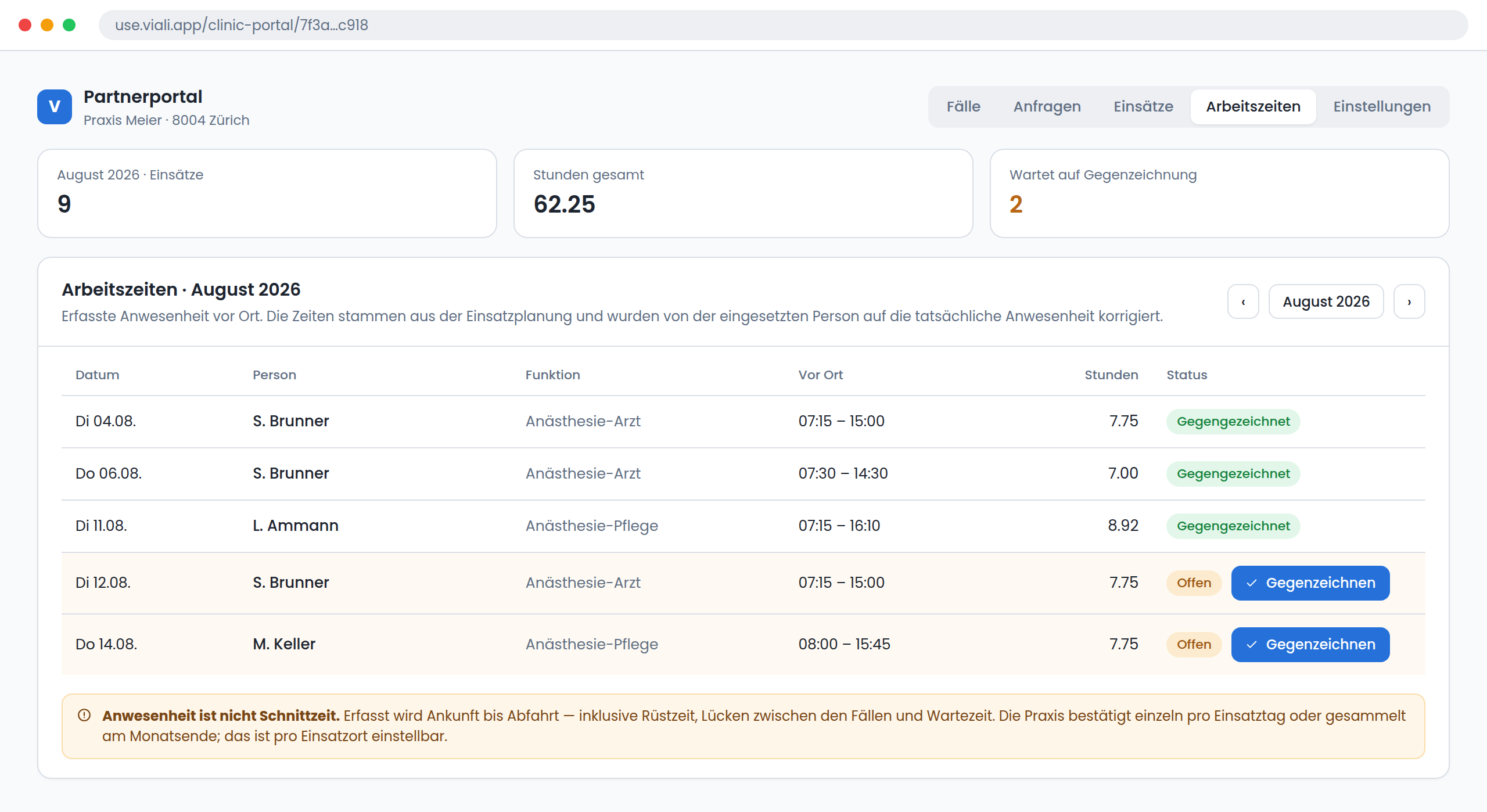
Whether a practice countersigns each day individually or collected at month end is set per site. Both happen in reality: the practice with a coordinator who signs everything off on Friday, and the practice where only the owner signs and does so once a month. For billing it changes nothing — countersigned is countersigned.
Step 6 · The month, by practice and by role
At the start of the month there is one page: per site, per role, the countersigned hours valued at the stored rate.
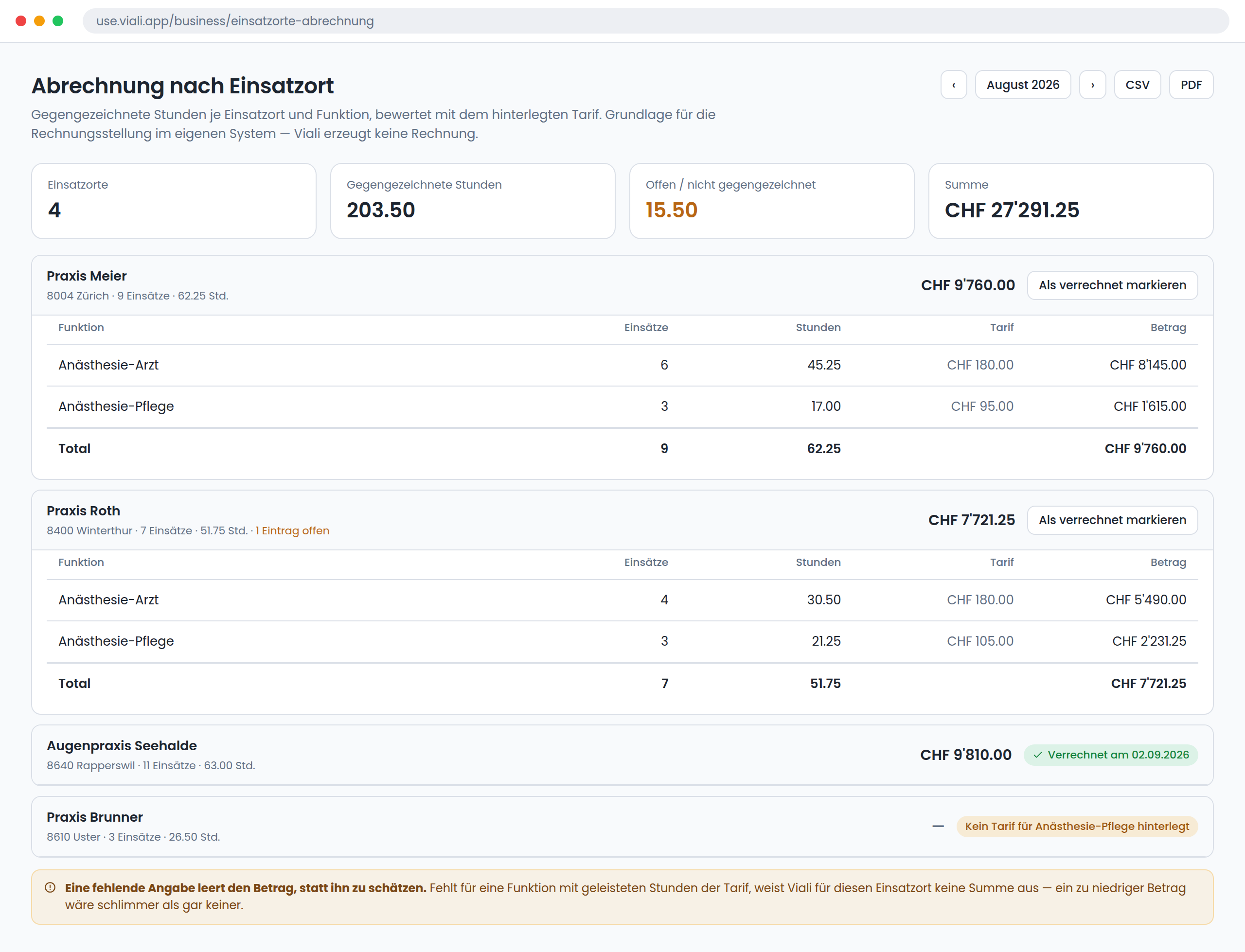
The drill-down goes to the line: date, person, times, countersigned or not. CSV and PDF export, and a *mark as invoiced* per practice and month.
Two things we deliberately did not solve differently:
- Viali does not generate the invoice here. An anaesthesia service has an accounting system where invoices are created, with number ranges, dunning and cost accounting. This page supplies its basis — it does not replace it.
- A missing input empties the amount rather than estimating it. If a role with hours worked has no rate, or two rates for the same practice are held in different currencies, Viali shows no total for that site and says why. A figure that is too low but looks plausible is worse than a blank that asks to be fixed.
What does not change: the clinical record
The part most often overlooked is the most important: anaesthesia stays entirely in the provider's own tenant — unchanged, at every location.
- The online questionnaire goes to the patient as soon as the case is submitted. That is why the contact detail in the portal is mandatory.
- Pre-operative assessment and premedication run exactly as for an in-house case: ASA classification, risk scores, comorbidities, medication, clearance.
- The anaesthesia record is kept on site — vital signs and ventilation data from the monitor, drug administrations, anaesthesia start and end, regional techniques and post-operative orders.
- TARDOC billing is produced from that same dataset, without anyone typing anything a second time.
That is the real leverage. One documentation standard across every location, regardless of who owns the theatre. The practice supplies the room and the procedure; anaesthesia — record, quality assurance, billing — stays complete with the provider. That part is covered in depth in TARDOC without a billing department and on the PDMS page.
What a practice needs — and what it does not
| It needs | It does not need |
|---|---|
| An email address | A Viali licence |
| A browser | An installation |
| Five minutes for the first day | Training |
| A password | |
| Master data of its own to maintain |
And the provider keeps what belongs to it: one plan across every location, one clinical record, one basis for hours, and a statement nobody has to reassemble from paper.
Frequently asked questions
Does every practice need its own Viali licence?
No. A practice is created as a site and receives a personal portal link by email. It has no account, no password and no installation — it submits its cases and countersigns hours.
How does a practice's operating list reach the plan?
The practice submits it in the partner portal under *submit the day*: one date, any number of cases. The cases appear immediately in the provider's OR plan, in that practice's column. There is deliberately no approval step.
How is staff assigned to practices?
With the *show distances* switch, every unstaffed practice column ranks the available people by commute time to that practice, shortest first, with the kilometres beside it and a flag for anyone without their own vehicle. Driving time rather than straight-line distance decides the order, because lakes and passes drive the two figures far apart in Switzerland. The ranking is a proposal; the assignment is still made by the planner.
Is billing based on incision time or presence?
On presence on site — arrival to departure, including setup and waiting. Times are pre-filled from the plan, corrected by the deployed person to actual presence, and countersigned by the practice.
Can a practice countersign monthly instead of daily?
Yes. Whether a practice confirms each day individually or collected at month end is set per site. It makes no difference to billing.
Does Viali produce the invoice to the practice?
No. Viali supplies the basis — countersigned hours per practice and role, valued at the stored rate, as CSV and PDF. The invoice is created in the provider's accounting system; the month can be marked as invoiced in Viali.
Do the questionnaire, premedication and anaesthesia record stay with the provider?
Yes, completely and unchanged. Online questionnaire, pre-operative assessment, intra-operative record with monitor data and post-operative orders all run in the provider's own tenant, regardless of which practice the case takes place in. TARDOC billing is produced from the same dataset.
Related articles
Product · Staffing
Introducing Viali FLEX: staffing without the double paperwork
Viali FLEX connects clinics, staffing agencies and external healthcare workers — one talent pool, one worker record, countersigned hours and no duplicate paperwork.
Billing
TARDOC without a billing department: describe the case, get the invoice
Practices and Belegärzte bill TARDOC themselves, usually with nobody to ask. The three decisions that break most invoices — and how a plain-language assistant takes them on.
Product · Scheduling
Booking a Surgery Slot Shouldn't Mean a PDF Form and a Three-Day Wait
External and referring surgeons request an OR slot online — submit, attach documents, track status, get confirmed by email. One clean queue for clinics.
Explore more
Viali FLEX
Temporary nursing staff without an agency.
PDMS
Anaesthesia documentation and perioperative risk.
Product
The whole Viali platform at a glance.
Ready to experience this yourself?
Book a demo and see how Viali transforms your clinic operations.