No patient data goes to an AI. That is the first rule.
Viali uses language models where they take work off your hands: answering questions, sorting orders, proposing reports and invoices. Every text is anonymised on our server first, every call is logged, and a person reviews the result. And your own AI can work with Viali through the MCP server.
What happens before a text leaves Viali
Anonymised on our server
Before a text goes to a language model, Viali replaces names, phone numbers, email addresses, AHV numbers and dates with placeholders on its own server in Geneva. Three layers do this: known values from the record, patterns, and a local model that detects personal data (OpenMed). The real values are put back into the answer only inside Viali.
Every call is logged
Viali writes an entry for every AI call: which service, which purpose, which person, and the anonymised text as it was sent. Every call passes through one place in the code; a test fails if a call bypasses it.
Which models we use
Text goes to Claude by Anthropic; reports, translations and note formatting go to Mistral (EU). Images are read by a vision model from OpenAI or from Mistral (Pixtral); the clinic chooses the provider in its settings. The voice entry of drugs in the OR is transcribed by OpenAI.
Images: what we do not promise
Photos are not anonymised. Viali sends only photos that show no patient identity: a monitor screen with readings, a product label in the store room. A photo of a person or of a patient document does not go to an AI.
Hosting, database and anonymisation at Exoscale in Geneva. More on the security page. Security and hosting
Your own AI agent works on your SOPs and checklists
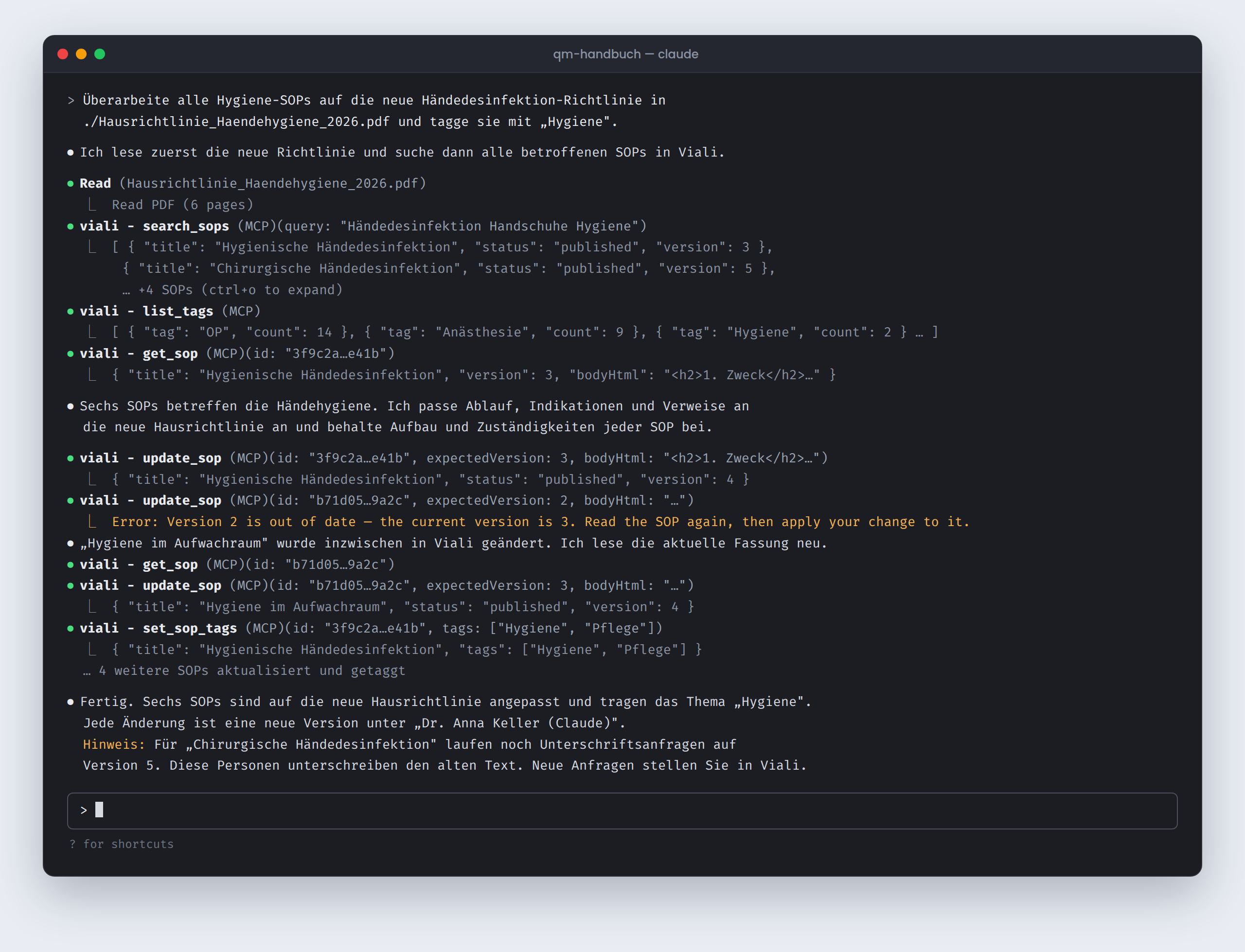
Viali has an MCP server (Model Context Protocol). A clinic admin creates a personal access under Admin → Integrations and connects Claude Code with one command. The agent then works under their name on the clinic's guidelines and checklists: many documents in one pass, reviewed by a person.
What it can do
List, read, search, create, change, publish, restore and tag SOPs. Read, create, change and deactivate checklists and assign them to units and roles. 22 tools, no delete.
Every change a version
A change by the agent is a normal version in the history, under the person's name with the suffix "(Claude)". Any earlier version can be restored. If someone changed the SOP in the meantime, Viali refuses the change; nothing is overwritten silently.
Tightly limited
The access is valid for one clinic and only for the areas ticked when it is created: SOPs, checklists or both. Patient data is not reachable. It is valid for 30 to 90 days, can be revoked at any time and ends when the person loses the admin or manager role.
What the AI in Viali does, by job
Each feature does one limited thing and puts the result in front of a person. None of them needs setting up; they are part of the platform.
1Asking
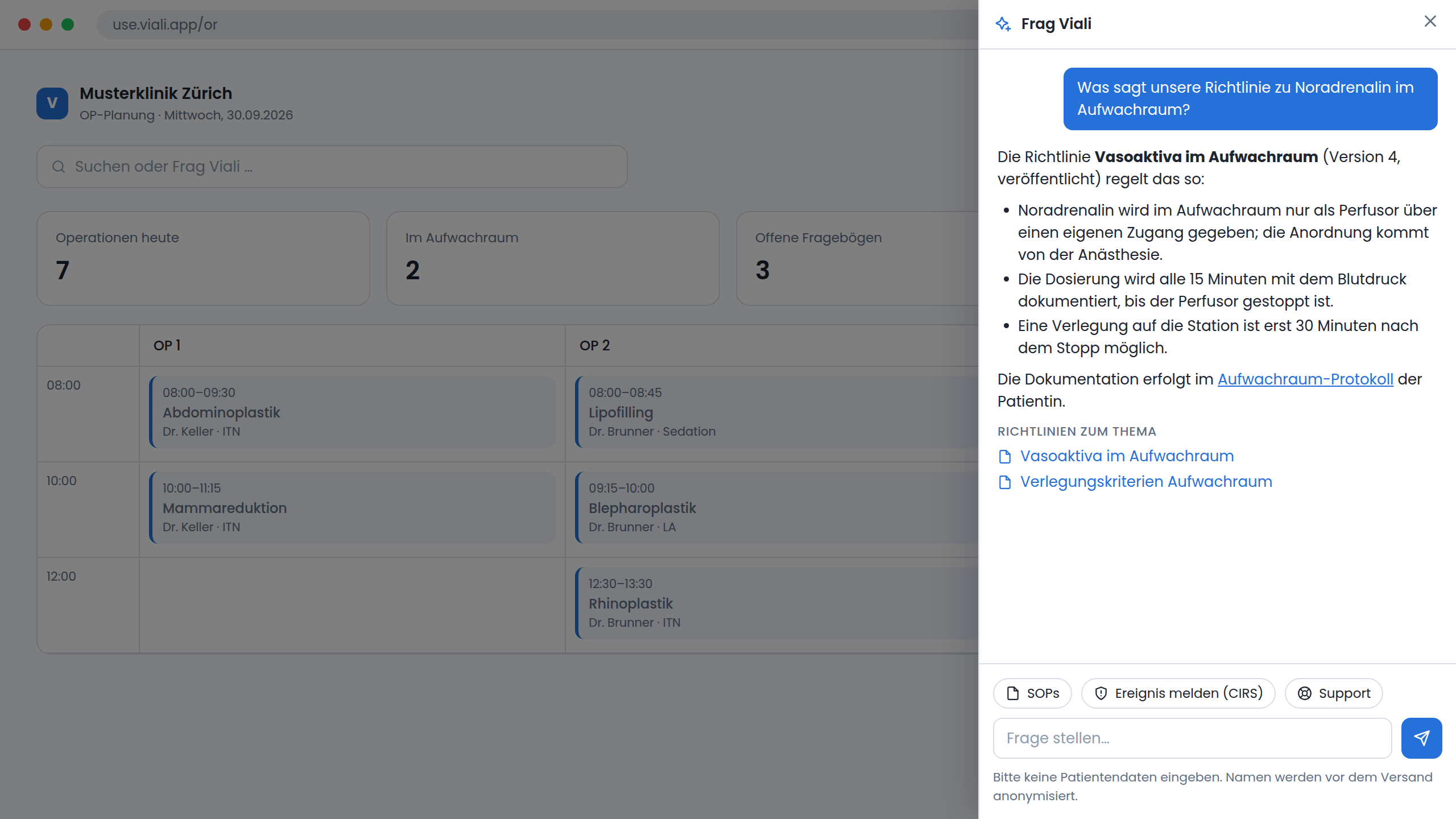
Ask Viali
A question about how something works in Viali or what your clinic's guidelines say. The answer comes from the handbook and from your clinic's published SOPs, with no general medical knowledge added, and links to the right page. If the anonymisation service is not reachable, the question is not sent.
2Documenting
Post-operative orders
Dictated or pasted text is split into individual orders: medications from the clinic's inventory, infusions, laboratory, monitoring, tasks. The proposals appear as a list; the person applies or discards them and then saves.
Drafting and improving SOPs
In the SOP editor you describe the topic and the AI writes a structured guideline that you edit ("Draft with AI", "Improve with AI"). Uncertain values are marked as to be confirmed. A new SOP starts as a draft.
Reports from the recorded data
Discharge reports, prescriptions and the operative report are generated from what is documented in the record: nursing, surgery, anaesthesia. The findings stay a placeholder that the doctor fills in. The report is reviewed, signed and locked.
Monitor readings from a photo
A photo of the patient monitor, and the readings (heart rate, blood pressure, SpO₂, ventilation) appear as a proposal in the anaesthesia record. For a photo taken by hand the person confirms the values before they are applied; with automatic camera capture they are charted and can be checked against the image afterwards.
3Billing
TARDOC assistant
From the operative report and a plain-language description, the assistant proposes the invoice: TARDOC positions, LKAAT candidates with their mapping, grouping into an Ambulante Pauschale and the cumulation check. It never receives the patient's identity or insurance, only age and sex. Nothing is applied before the person confirms the proposal.
4Communicating and organising
Newsletters and automations
You describe the message in one sentence; the AI writes the SMS, email or HTML newsletter in the style of your website. You review the text and send it yourself; an invented price offer is flagged.
Offers, contracts, job postings
A dictated note becomes a structured treatment offer; a description becomes a contract template or a job posting. The text is anonymised before processing; the person edits the result.
Fit of applications
The CV is read locally, stripped of name, email and phone and compared with the requirements of the position. The result is a fit from 0 to 100 with strengths and gaps, as a first sorting. The model may not assess identity, gender, age or origin. People make the decision.
Practice website from a description
A simple practice page with online booking, written and changed in a chat; opening hours and holidays come from Viali. Experimental: an admin switches it on under Admin → Settings → Experimental.
What the AI does not do
- No diagnosis and no medical decision. The assistants sort, phrase and propose.
- No automatic sending. A message, a report or an invoice leaves Viali only when a person releases it.
- No access to the patient record by an external agent. The MCP server knows SOPs and checklists, nothing else.
- No proposal quietly becomes the truth. Orders, invoices and reports are reviewed and saved by a person.
Common questions
Questions about AI in your clinic?
In a short online demo we show you how the anonymisation, the log and the assistants in Viali work. Your data protection officer is welcome.