Your AI on our app: managing SOPs with Claude
Not our AI in your app, but your AI on our app: with Viali's MCP server, Claude Code works directly on a clinic's SOPs, with every change versioned and no access to patient data.
TL;DR
Viali now has an MCP server at use.viali.app/mcp. A clinic admin creates a personal, time-limited access and connects Claude Code with one command. The agent can list, read, search, create, change, publish, restore and tag the clinic's SOPs, many at once. Every change is a normal version shown as "(Claude)", nothing is overwritten silently, there is no delete tool, and no patient data is reachable.
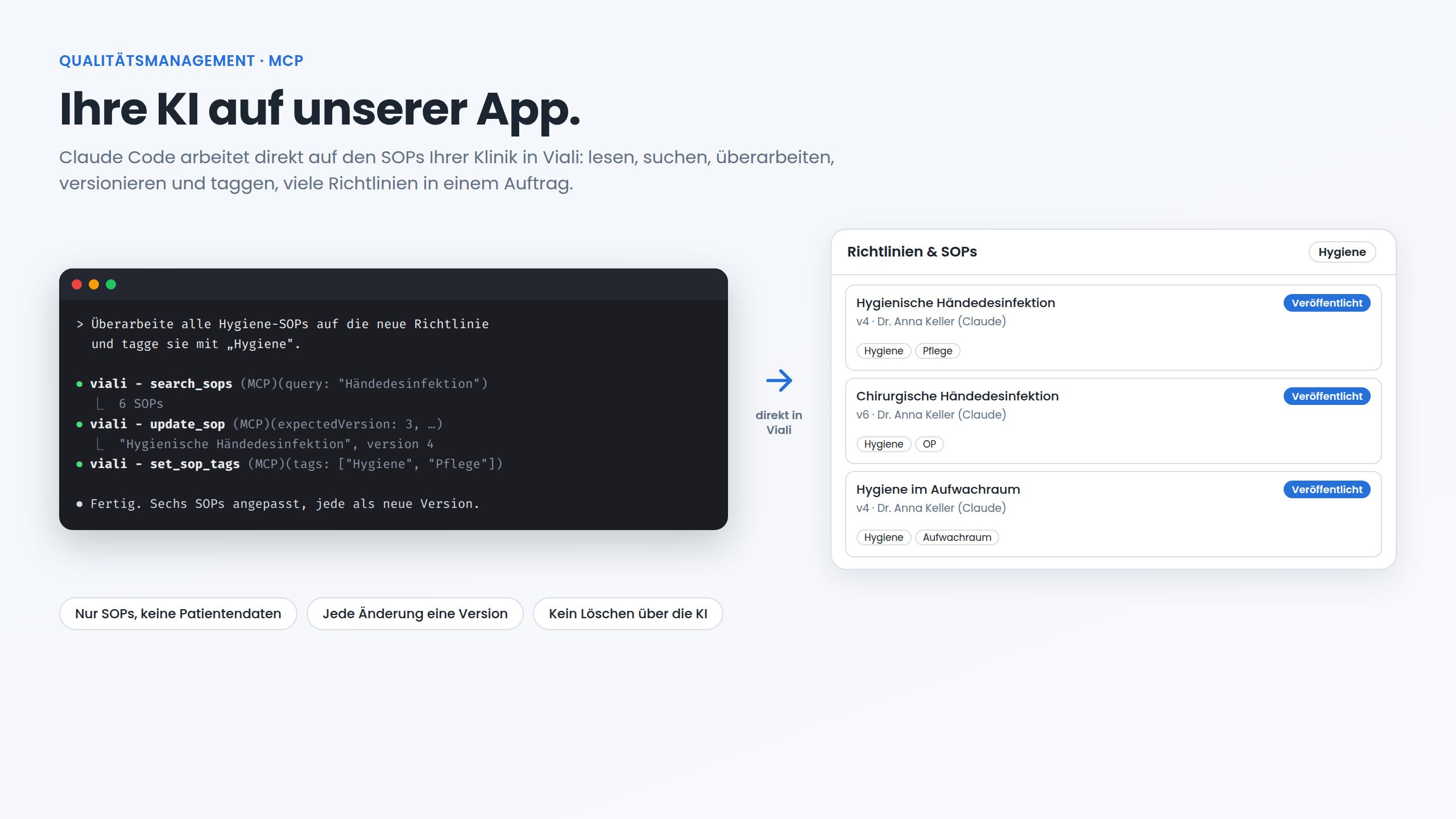
Some time ago, someone on LinkedIn told a software vendor, more or less: "I don't want your AI inside your app. I want my AI on your app." The sentence makes a point that many vendors miss. People who work with their own AI assistant every day do not want a different, smaller assistant in every piece of software. They want their assistant to be able to use the software.
We applied that sentence to Viali itself: Viali now has an MCP server. The first area it opens is a clinic's SOPs and guidelines.
The QM manual as a folder full of files
In most clinics the quality management manual is a folder: Word files, PDFs made from them, an Excel list of versions, plus copies on the network drive and in email attachments. When a higher-level rule changes, for example the clinic's own hand hygiene policy, the search begins: which of the forty documents mention the topic? Which copy is the valid one? Who changed something last?
In Viali an SOP is not a file attachment. It is a digital document with a status (draft or published), a version history, signature requests to the team, and an assistant that answers staff questions from the published guidelines. That was the foundation. With the MCP server an AI agent can now work with these documents too, and with many of them at once.
What the MCP server does
MCP (Model Context Protocol) is an open standard that lets AI agents use the tools of other programs. At https://use.viali.app/mcp Viali provides 12 tools for one clinic's SOPs:
- Read and find: list SOPs (by status, topic or search word), read one SOP in full, search the full text (drafts included).
- Write: create a new SOP (always as a draft), change an SOP, publish it or set it back to draft.
- Versions: see the version history, read an earlier version and restore it.
- Topics: set topics (tags), list all of the clinic's topics with their counts, rename a topic in every SOP or merge two topics.
There is deliberately no delete tool. Deleting stays a decision that a person makes in Viali.
One request instead of forty dialogs
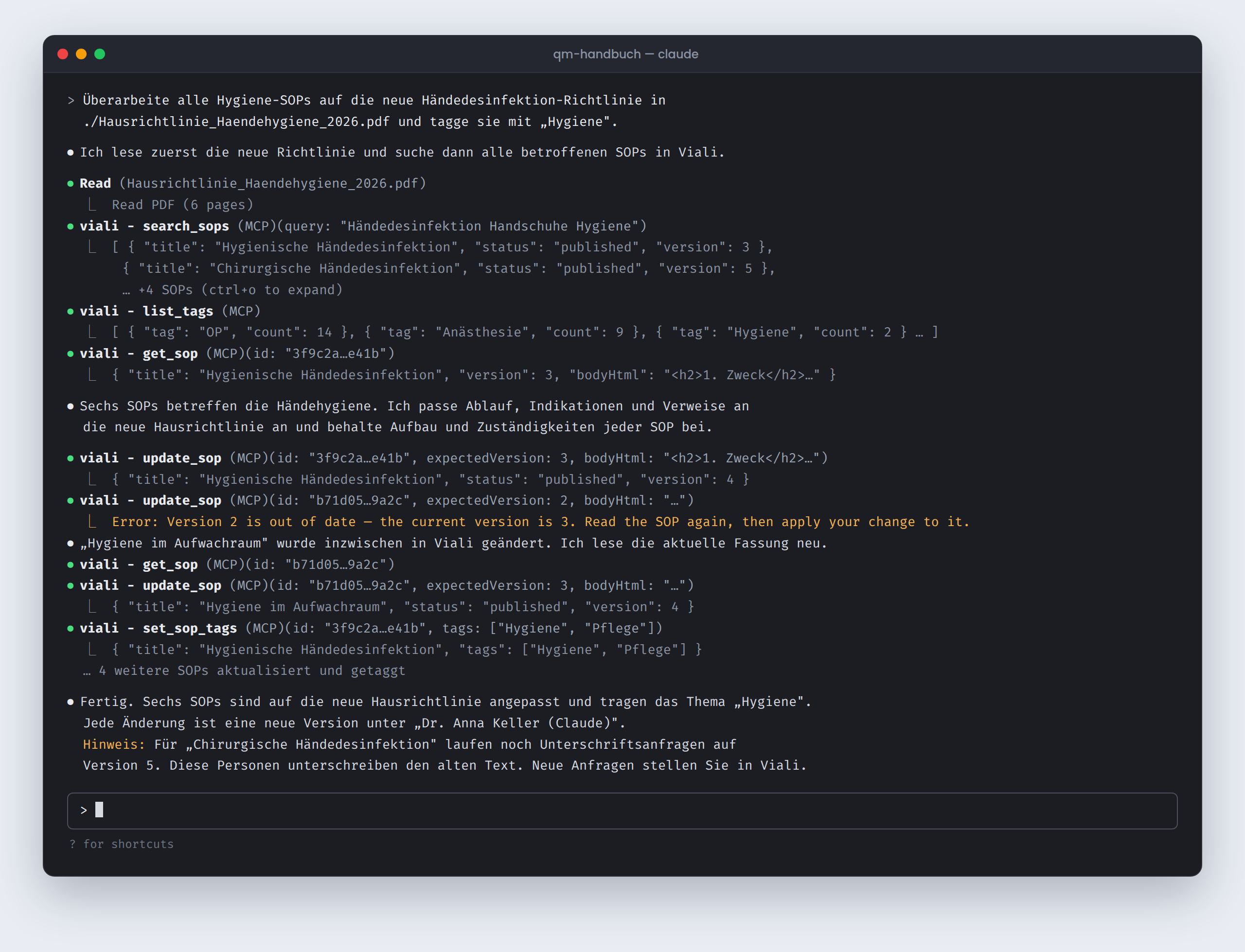
The example above shows a typical request: "Revise all hygiene SOPs to the new hand disinfection policy and tag them 'Hygiene'." The agent reads the new policy from a local file, searches Viali for every affected SOP, reads each one, adjusts the text and sets the topic. At the end it reports what it did and what the clinic has to look at.
We use this at Viali ourselves. Our founder now writes and maintains SOPs as a user through Claude Code, much faster than with the AI in the SOP editor ("Draft with AI", "Improve with AI"). The editor is good for a single guideline. For a whole manual your own agent has the advantage: it has the clinic's other documents at hand, it works through many SOPs in one pass, and a person reviews the result instead of typing every change.
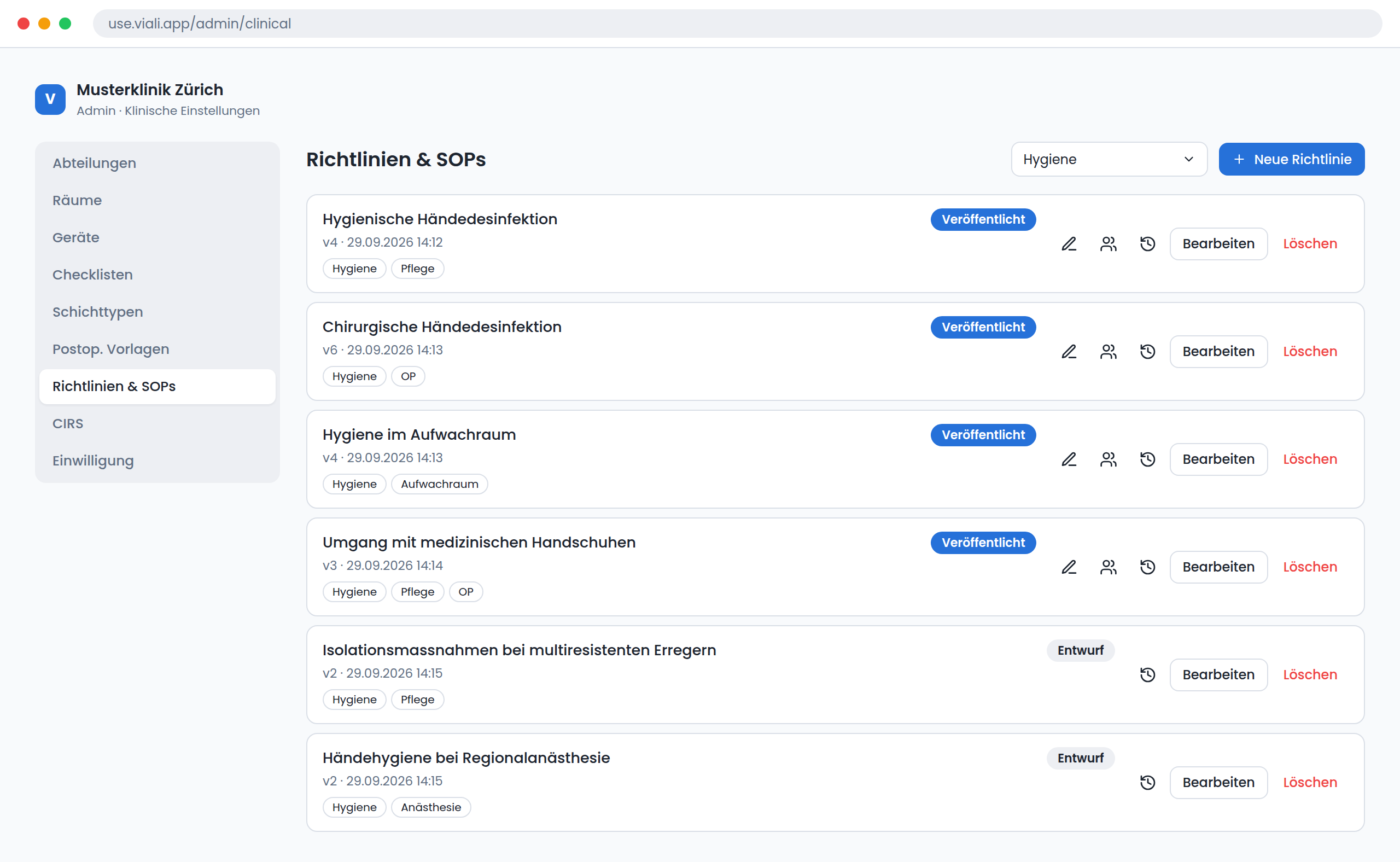
Topics are new in Viali. They appear in the SOP list as small chips and as a filter, for admins and for staff. A nurse finds all hygiene guidelines with one click.
Nothing gets lost
A clinic can only trust an agent with its guidelines if every change can be traced and undone. So the agent follows the same rules as the app:
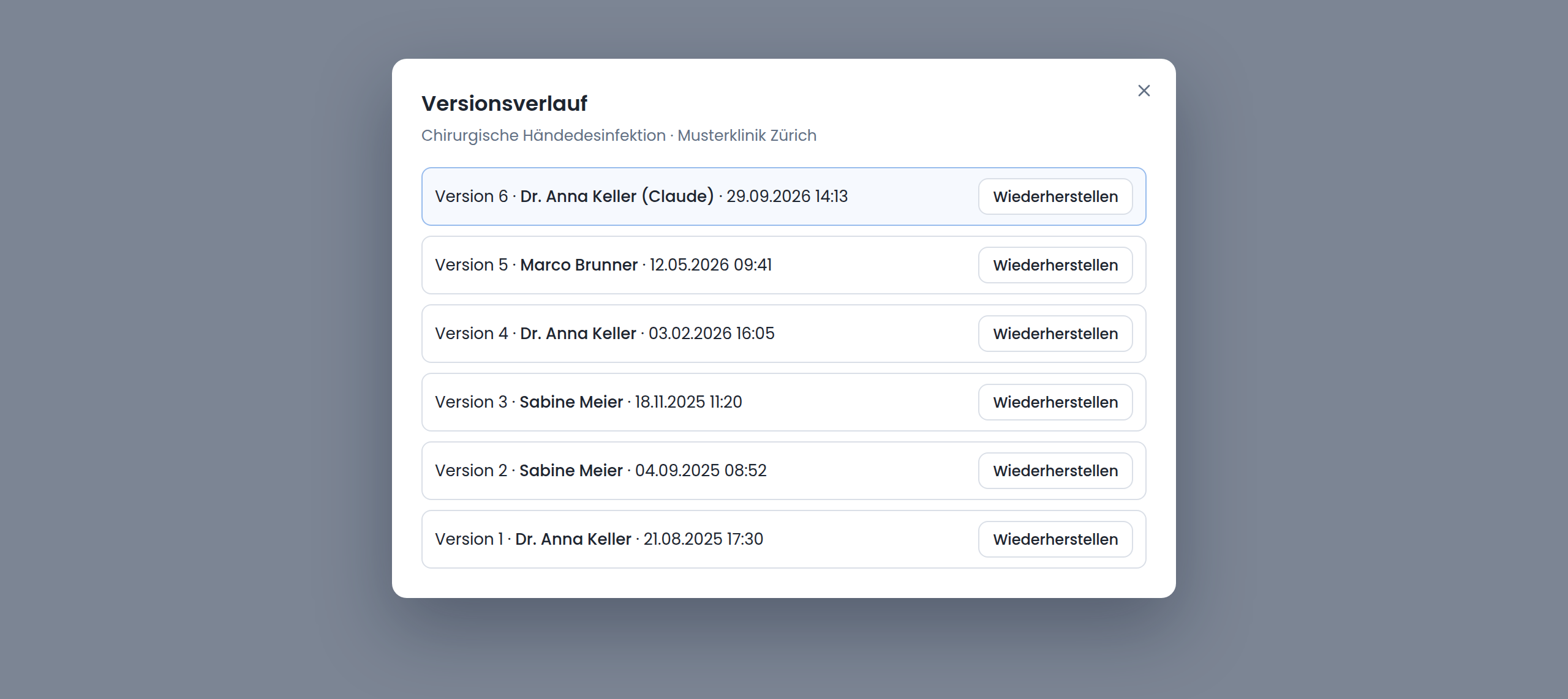
- Every change is a version. The version history shows the name of the person who created the access, with "(Claude)" added, for example "Dr. Anna Keller (Claude)". Any earlier version can be restored at any time.
- No silent overwrites. Every change names the version it was based on. If a colleague changed the SOP in Viali in the meantime, Viali refuses the change. The agent reads the current text again and applies its change to it.
- New SOPs start as drafts. Staff only see them once they are published.
- Signatures stay in your hands. Publishing sends no signature requests. If requests are still open on an older version, the agent gets a warning that those people are signing the old text.
Security: one clinic, SOPs only, no patient data
- SOPs only. The MCP server knows no patients, appointments, invoices or other data. No tool reaches beyond the SOPs, and no other Viali interface accepts the token.
- One clinic. Every access belongs to exactly one clinic.
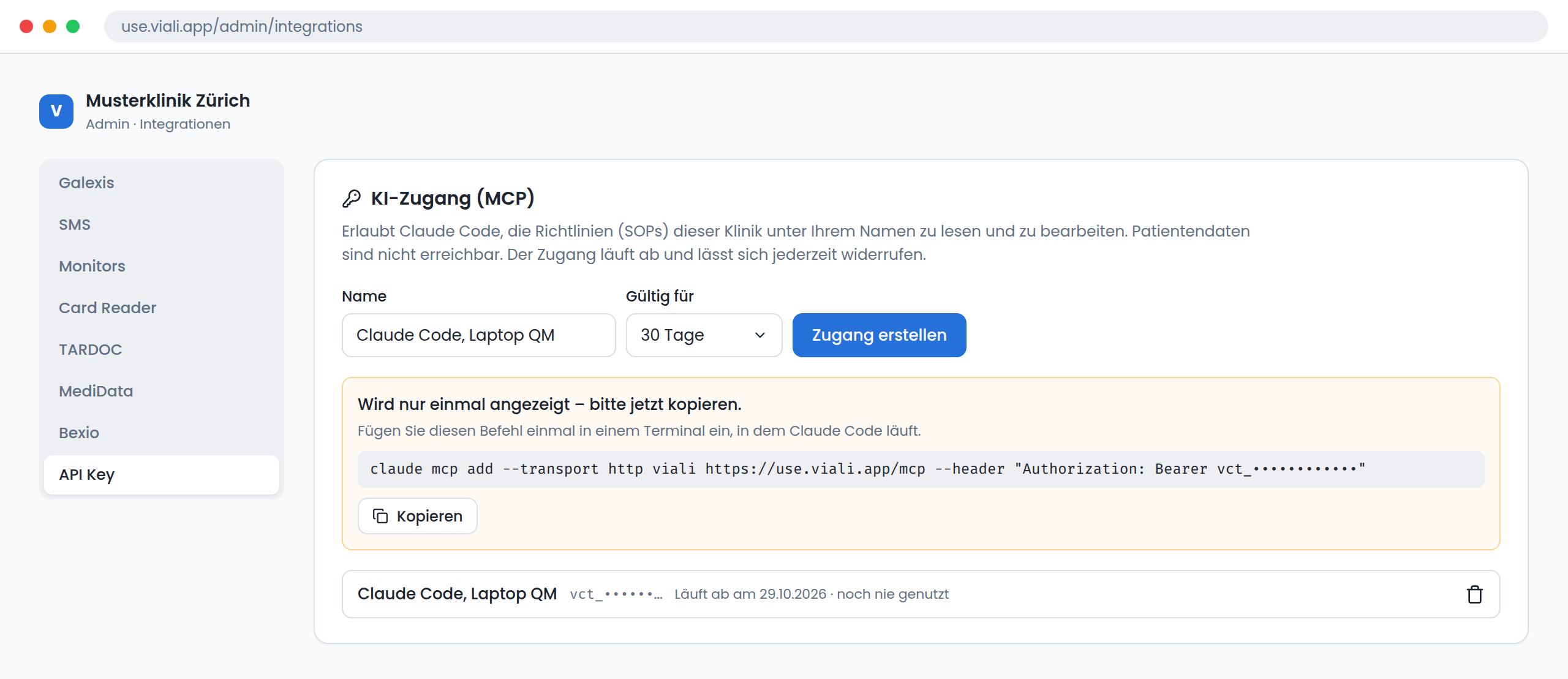
- Personal and time-limited. A clinic admin creates the access for themselves. It is shown once, is valid for 30, 60 or 90 days and can be revoked at any time. If the person loses the admin or manager role, the access stops working immediately.
- Limited. At most 120 requests per minute per access. When a clinic is read-only because of billing, Viali refuses every change.
More about how Viali keeps data is on the security page.
How to start
- 1In Viali, go to Admin → Integrations, tab API Key, open the card AI access (MCP), choose a name and a validity, and click Create access.
- 2Paste the command shown once into a terminal where Claude Code runs:
claude mcp add --transport http viali https://use.viali.app/mcp --header "Authorization: Bearer vct_…"- 1Give Claude Code a request, for example: "List all SOPs without a topic and suggest topics for them."
Today Claude Code connects with the access. A connection for claude.ai and Claude Desktop through OAuth is planned. The technical description is in the Viali API documentation.
Why we build it this way
Clinic software does not have to invent every AI assistant itself. It has to offer its data cleanly structured, versioned and safely limited, so that the clinic's own assistant can work with it. SOPs are the first area. The rules stay the same: clearly limited access, every change traceable, no patient data.
Frequently asked questions
What is the Viali MCP server?
An endpoint at https://use.viali.app/mcp that uses the Model Context Protocol (Streamable HTTP). It lets an AI agent such as Claude Code list, read, search, create, change, publish, version and tag the SOPs of one clinic. There are 12 tools. There is no delete tool.
Can the AI agent see patient data?
No. The token is valid for one clinic and for SOPs only. No tool of the MCP server reaches patients, appointments or any other data, and the token is not accepted by any other Viali route.
Who can create an access, and how long is it valid?
A clinic admin creates a personal access in Admin → Integrations, tab API Key, card AI access (MCP). The token is shown once. It is valid for 30, 60 or 90 days, can be revoked at any time and stops working when the person loses the admin or manager role.
What happens if a colleague changes the same SOP at the same time?
Each change must name the version it was based on. If the SOP changed in the meantime, Viali refuses the change and returns the current version number. The agent then reads the current text again and applies its change to it. Nothing is overwritten silently.
Which AI tools work with it?
Claude Code today, connected with one command. A connection for claude.ai and Claude Desktop through OAuth is planned.
Related articles
Marketing & Analytics
Flows: AI Editor and A/B Testing for Campaigns That Convert
You now know your ads are working. The next step: send campaigns in a few clicks — with AI-generated variants and built-in A/B testing.
Practice Management
6 Essential Questions to Ask Before Choosing Software for Your Aesthetic Practice
The software you choose shapes both clinical precision and business growth. Six questions that separate platforms that truly work from ones that just look good in a demo.
Clinic Operations
A Busy Clinic Is Not Always an Efficient Clinic
Phones are ringing. Appointments are moving. Staff are multitasking. From the outside, everything looks smooth. But busyness is not the same as efficiency — and that difference costs clinics every single day.
Explore more
Product
The whole Viali platform at a glance.
CIRS
Anonymous critical-incident reports, through to the SOP that comes out of them.
Security
Where the data is, who can reach it and how access is logged.
Ready to experience this yourself?
Book a demo and see how Viali transforms your clinic operations.